
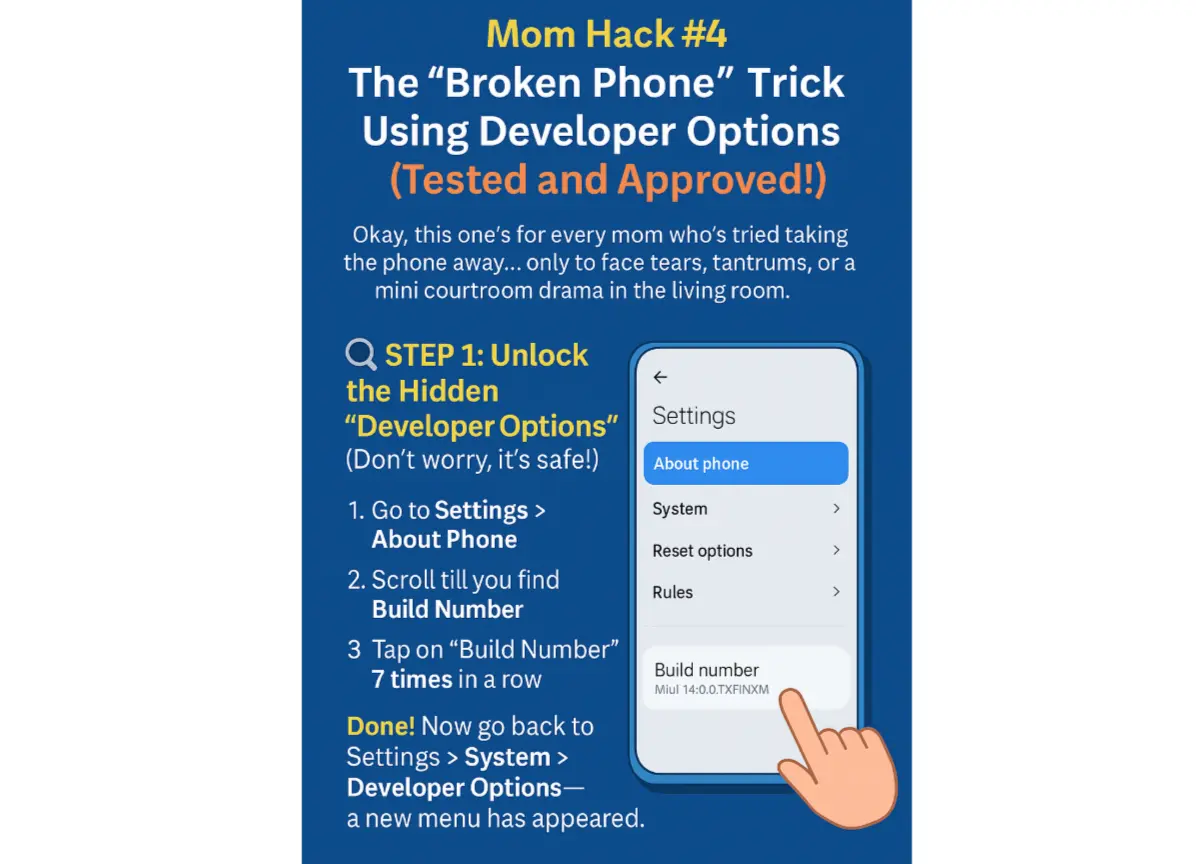
Top 3 Developer Mode Trap: How to Make Any Phone Look “Broken” Without Actually Damaging It. This one’s for when your child just won’t let go of their phone and you want them to think it’s acting up—without taking it away or raising your voice. Here’s what you can do:
Enable Developer Options (If not already)
For Android:
- Go to Settings > About Phone
- Tap Build Number 7 times until you see “You are now a developer!”
NOTE: Think of the Build Number as your phone’s “version tag.” It tells you which software version your phone is currently running—kind of like a batch number on a product.It usually looks like a jumble of numbers, letters, and words like:MIUI 14.0.4.0.TKFINXM (for Xiaomi/Redmi phones)
TP1A.221005.002 (for Pixel phones)
One UI 6.1 (on Samsung devices, though it appears deeper)
It’s not something you normally need… unless you want to unlock the Developer Options!
So next time you see something like MIUI version, Build number, or anything ending in .INXM, .WW, or .XX, that’s the one you’ll tap 7 times.
- Go back to Settings > System > Developer options
Now, Let the Pranks Begin:
1. Slow Down Animations (10x Slower!)
This makes every swipe, tap, and open/close feel like the phone is lagging or glitchy.
- In Developer Options, scroll to:
- Window animation scale → Set to
10x - Transition animation scale → Set to
10x - Animator duration scale → Set to
10x
- Window animation scale → Set to
Effect: The phone feels incredibly slow—apps take forever to open, screen transitions drag, and it drives kids nuts!
2. Set Phone to Monochrome (Grayscale Mode)
- Still in Developer Options or Accessibility > Color Correction, turn on Monochromacy or Simulate color space → Monochromacy
Effect: The entire phone turns black and white. Kids freak out thinking the screen is dying or broken.
3. Disable Touch Response (For Extra Chaos)
If you really want to go pro-level:
- In Developer Options, turn on:
- Show taps (so they think it’s detecting touch)
- Then enable Pointer location (to add weird lines across the screen)
- Or toggle Force GPU rendering for slight graphical weirdness.
Effect: They’ll feel like the phone has a virus or is glitching badly. Panic level = rising.
Pro-Tip: Blame the Rainy Weather or Charger Surge
Say something like:
“I think charging your phone overnight during the thunder messed it up…”
or
“Looks like a virus came in through that weird game you downloaded.”
They won’t question a thing.
To Reset:
When you’re ready to reverse the prank:
- Set all animation scales back to
1x - Turn off color simulation
- Disable any other toggles you enabled
Everything will be back to normal in seconds.
← Mom Hack Alert: The Genius Phone Lock Trick That Actually Works











Leave a Reply